FLV Embed

679 comments · AddThis

Latest version:
1.2.1
2009.01.13

FLV Embed is a WordPress plugin made to simplify the process of adding Flash videos (FLV) into your blog using Jeroen’s FLV Player.

For commercial use and implementation, you need to purchase a license for the player. If you want information about encoding videos into FLV and why you should use FLV, Jeroen has also written an excellent article which you can find on his site.

First of all, I do know there are already quite a few plugins that does similar things but I decided to make my own plugin for several reasons:

  • to enforce a standard plugin tag style (all of my other plugins use the same tag style)
  • no bells and whistles, this plugin embeds an FLV file and does it the easiest way
  • uses highly portable, extensible and future proof tags
  • XHTML compliant for those who cares about validation

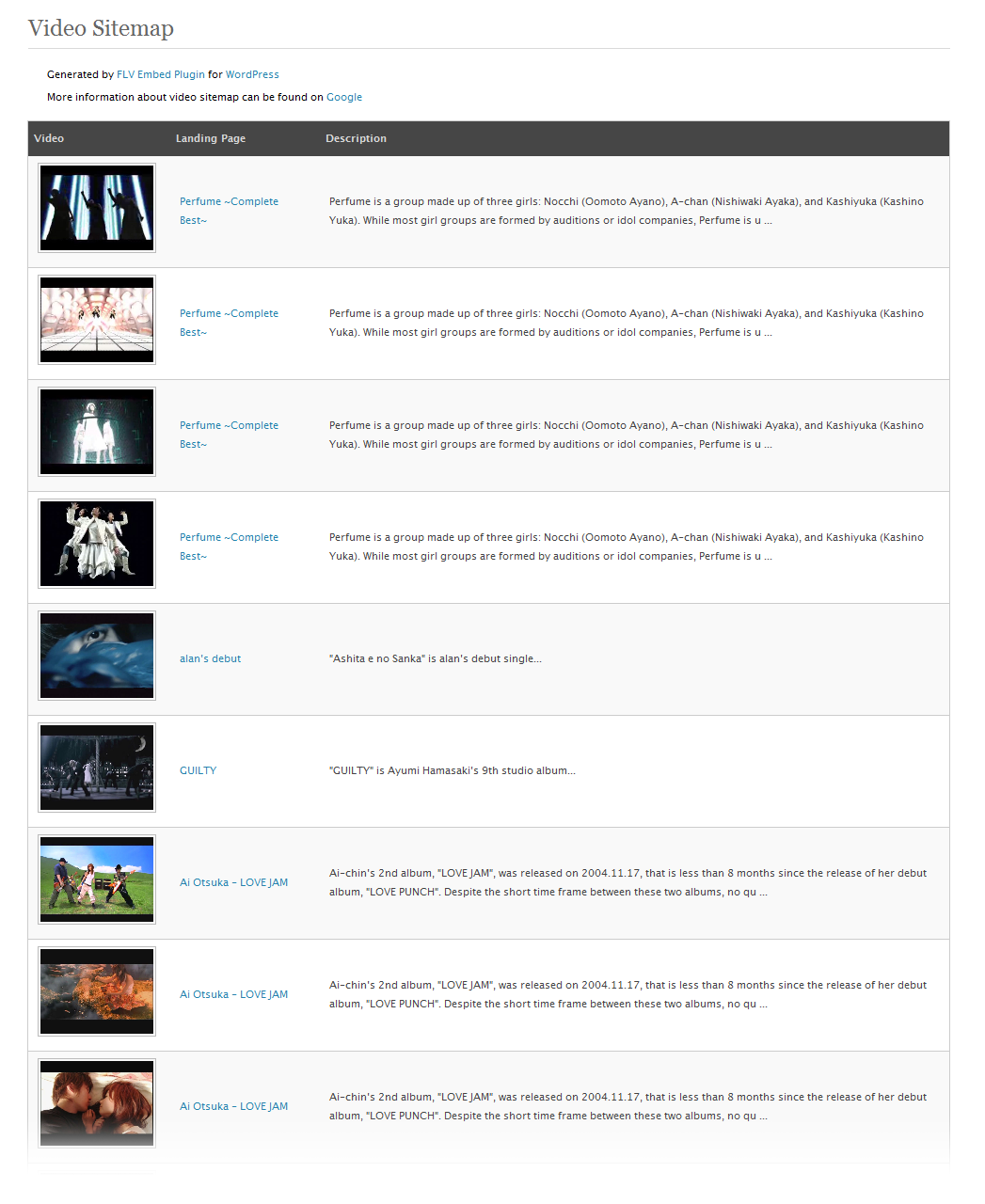
Starting from version 1.0, FLV Embed supports Google video sitemap generation, the first WordPress plugin that does it for you! ;)
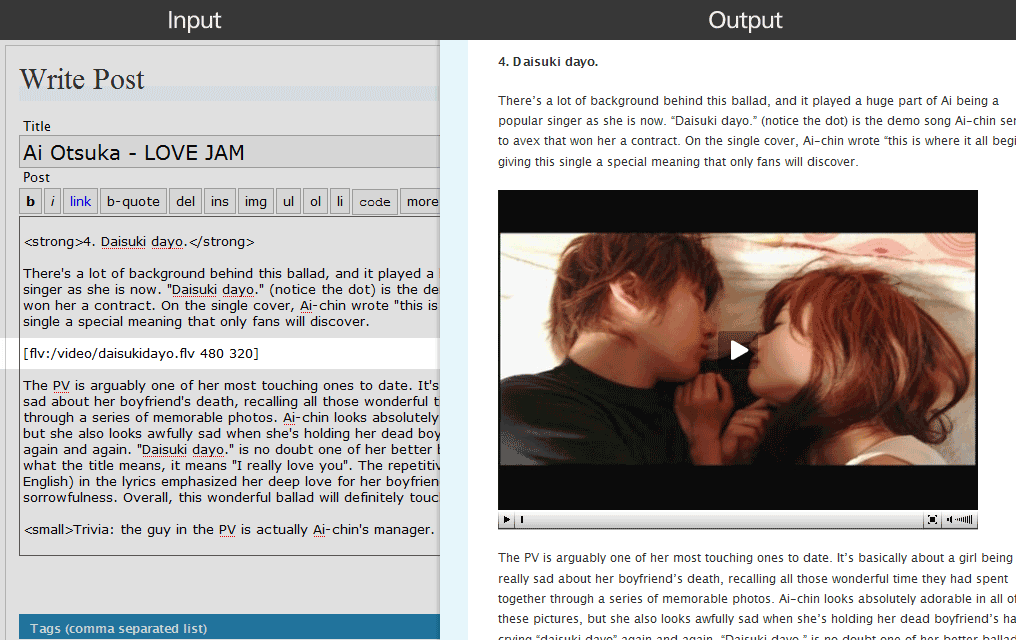
FLV Embed plugin screenshot
FLV Embed in action
FLV Embed video sitemap screenshot
Video sitemap

Features

  • uses simple, intuitive tags to generate Flash video (FLV) movies for your posts
  • supports video sitemap generation
  • standards compliant: valid XHTML
  • many options are configurable, such as autostart, show/hide control bar, player colour, poster image, full screen button etc.
  • highly interactive admin option panel for player configuration
  • supports text only output for RSS that prompt readers to visit the original post for Flash content
  • supports outputting poster image for RSS if desired
  • accessibility: requires Javascript to display FLV player, but will prompt user to enable Javascript when disabled
  • accessibility: prompt user to download latest Flash player if it is not installed or too old
  • accessibility: no annoying “click to activate” for IE users

Usage

This plugin uses one universal, standard tag style:

[flv:url width height]
  • url – the URL of the FLV file you want to embed, the path can either be site-relative or absolute
  • width – width of the FLV movie
  • height – height of the FLV movie

Jeroen’s FLV Player supports poster frame so you can turn on this feature via options if desired. The following two examples show FLV embed with and without poster frame.


Without poster frame
The poster frame feature is turned off by default.

Example input:

[flv:/video/demo.flv 480 368]

Example output:


With poster frame
In order to use this poster frame feature, you will need to turn it on via options. Once turned on, the player will look for preview image that share the same filename as the embedded FLV file. For example, if your embedded FLV file is “demo.flv”, the player will display “demo.jpg” as preview image. By default, the filetype of preview image is “jpg”, but this can be changed via options.

Example input:

[flv:/video/demo.flv 480 360]

Example output:


Version 0.3 onwards
Starting from version 0.3, it is possible to have your poster image at a different location than your FLV files. To achieve that, an optional 4th argument for the input tag and a new option $flv_posterpath were introduced. Below shows the tag syntax that should be used to provide a poster path:

[flv:movie poster width height]
  • movie – the URL of the FLV file, the path can either be site-relative or absolute
  • poster – the URL of the poster image, the path can either be site-relative or absolute
  • width – width of the FLV movie
  • height – height of the FLV movie

It is recommended that you try different settings for $flv_posterpath (found in option panel) and poster argument to have a feel how they work. There are several different ways how you could combine $flv_posterpath and optional poster path tag parameter to tell the plugin the poster location is not the same as the flv location.

If all your poster images are put within the same directory but not the same as the FLV files, change $flv_posterpath to point to your image directory, and no poster argument is required when using the embed tags. Make sure all the poster images have the same filename as the FLV files. If your poster images are scattered all over the places i.e. not within the same directory and not necessarily has the same filename as your FLV files, then use the poster argument to indicate where the poster image is.

The plugin detects the path used in the tags to determine if $flv_posterpath and $flv_flvpath should be used. In cases where absolute or site relative path are given as argument for the tags, $flv_posterpath and $flv_flvpath will have no effect on the output.


Users without Flash or Javascript
Unfortunately, about 2% of your users might not have Flash installed and about 10% of them might not have Flash 8 or above according to Adobe. For these users, the ufo.js will detect and output appropriate message that prompts these users to download and install latest Flash player onto their computers. Here’s an example screenshot that show you how this works:
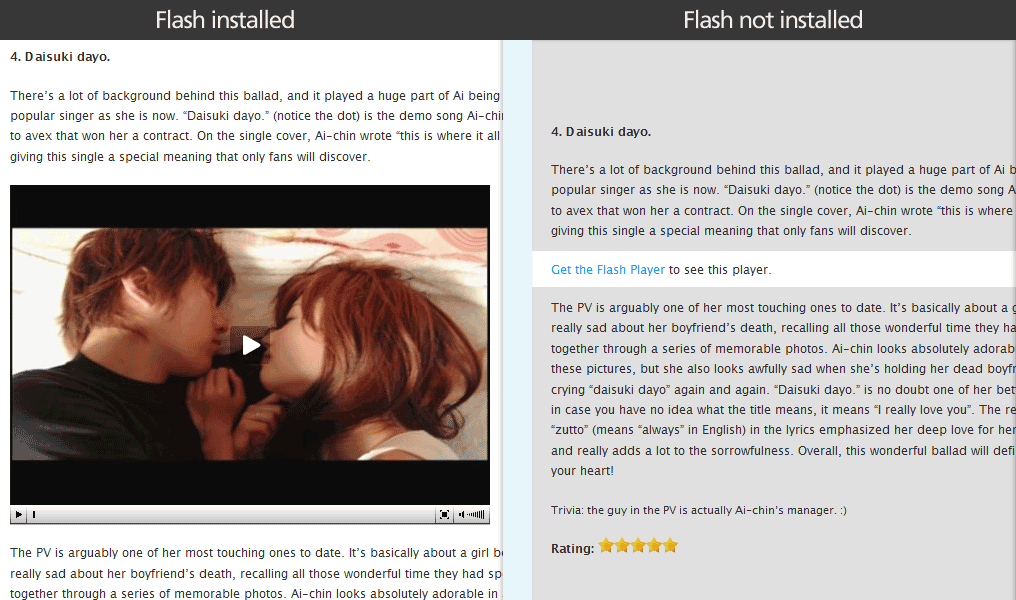
With vs. Without Flash
Flash accessibility

While most modern browser supports Javascript, some users are too afraid that Javascript will screw up their computer so they turn it off just to be safe. This becomes a problem because this WordPress plugin relies on Javascript to display the FLV Player. To solve this problem, “noscript” tags are used to prompt these users to enable their Javascript and refresh the page for the Flash player to show up. Here’s an example screenshot:
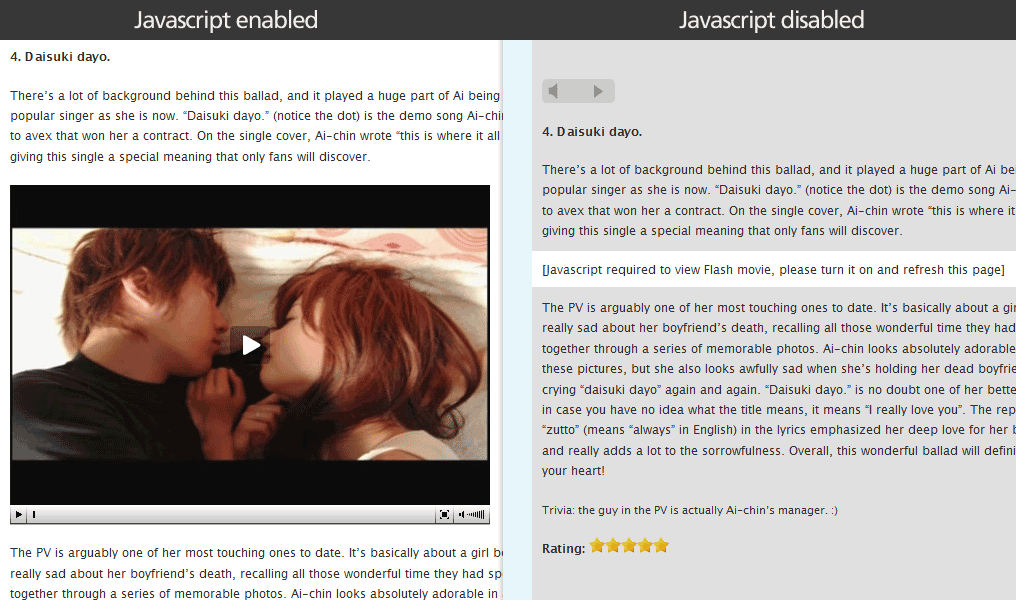
With vs. Without Javascript
Javascript accessibility


Text only output:
By default, this plugin will output text that reads “[See post to watch Flash video]” for your RSS feeds only. If you wished you could display the poster image in your RSS feeds by setting $flv_posterinfeed option (see below) to 1.

Demo RSS feed

Sitemap

Starting from version 1.0, FLV Embed supports video sitemap generation. In order to see the video sitemap option panel, you need to turn on the sitemap feature under your FLV Embed option panel.

The plugin will try to create a video sitemap file in your blog root but this might not be successful depending on your server configuration. If the plugin is unable to create the video sitemap file for you, then you will need to manually upload the video sitemap file to your blog root, chmod it “664″ (or “666″ depending on your server configuration) and tell the plugin where to locate your video sitemap under options.
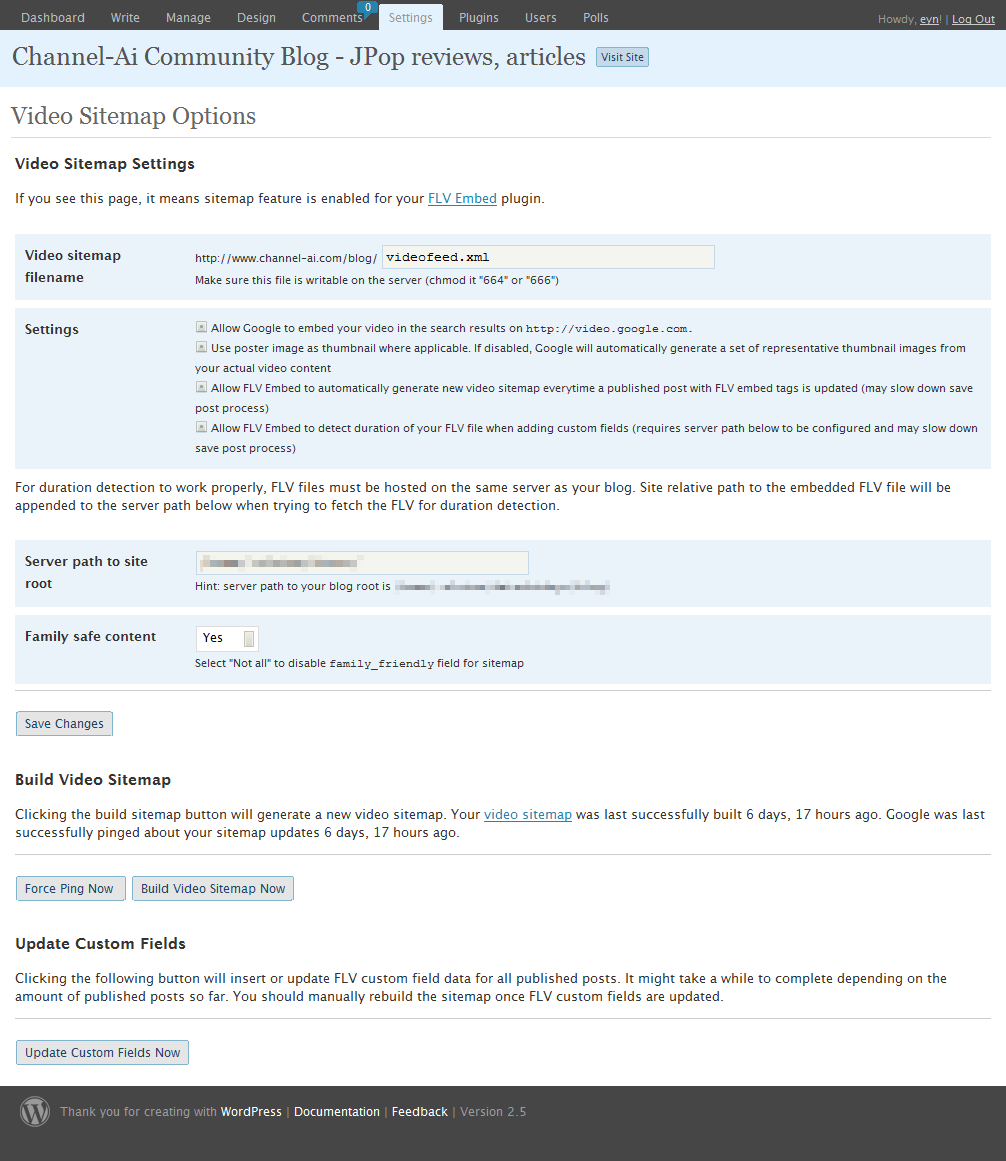
FLV Embed sitemap settings screenshot
Video sitemap settings

Custom field data are used by the plugin to generate the video sitemap. If you have been using FLV Embed in the past, you can tell the plugin to insert missing custom field data for all published post by clicking the “Update Custom Fields” button within your video sitemap option page. This will also update any existing custom fields should there be any noticeable changes.

Automatic custom field insert can be disabled on a per post basis by putting [flv:skip] at the end of your blog post. Each time video sitemap is rebuilt successfully, Google will be pinged about the sitemap updates automatically. This plugin will try not to ping Google more than once per hour (as per Google’s suggestion), but you can override this by manually pinging via the “Force Ping” button found in sitemap option panel.

Click on the demo below to have a look how the generated video sitemap will look like. You might want to “view source” to see the actual XML content.

Demo video sitemap

Options

Starting from version 1.0, you can change just about everything this plugin does using the plugin option panel. Below list some of the parameters that might be confusing for you when changing different options.
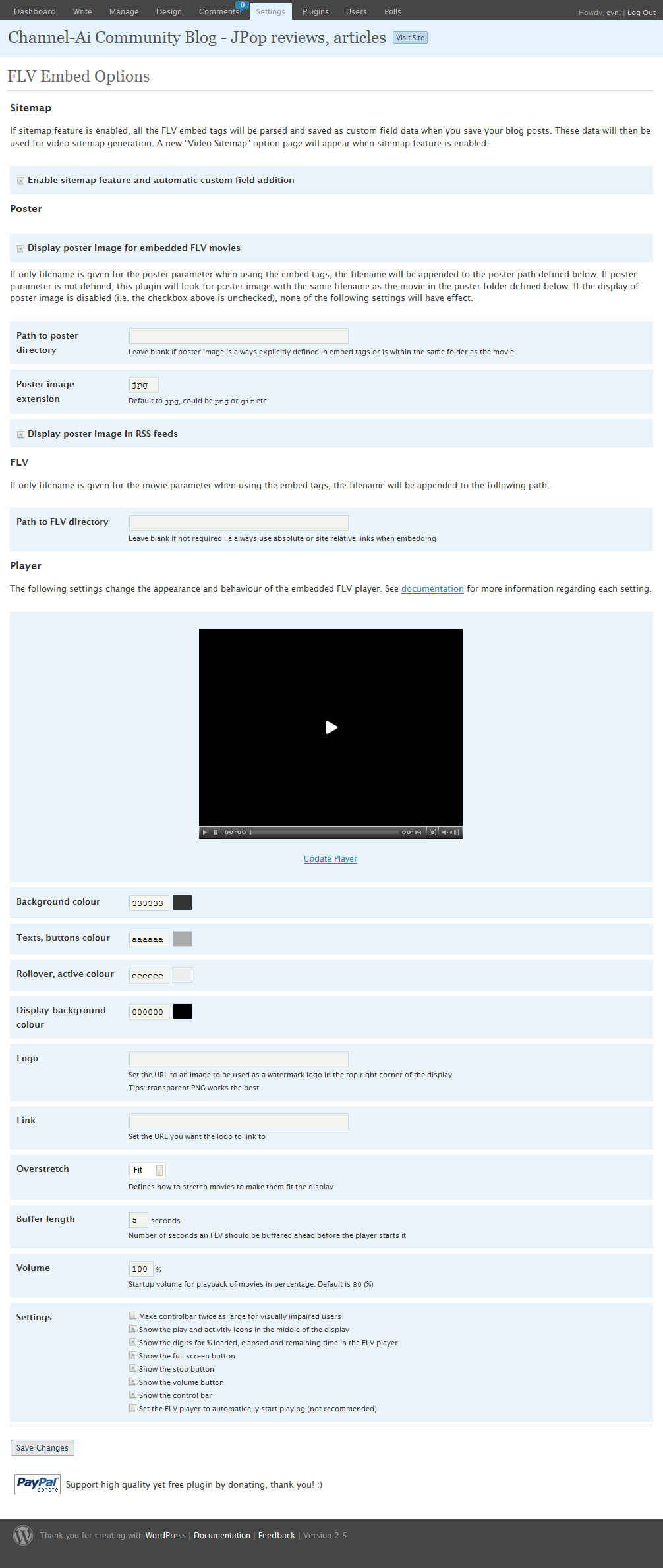
FLV Embed settings screenshot
FLV Embed settings
  • $flv_useposter: 0 to disable poster frame, 1 to display poster frame i.e. preview image
  • $flv_posterinfeed: 0 to show text only output in feeds, 1 to display poster frame i.e. preview image in feeds
  • $flv_imagetype: Preview image extension, can be “jpg”, “png” or “gif”
  • $flv_posterpath: Path to poster images, trailing slash required
  • $flv_flvpath: Path to FLV movie files, trailing slash required
  • $flv_backcolor: Background color of the FLV Player *
  • $flv_frontcolor: Texts / buttons color of the FLV Player *
  • $flv_lightcolor: Rollover/ active color of the FLV Player *
  • $flv_screencolor: Background color of the display of the FLV Player *
  • $flv_logo: URL to watermark logo that will be displayed at the bottom right corner
  • $flv_link: URL to go to when the logo is clicked
  • $flv_overstretch: Defines how to stretch images/movies to make them fit the display.
    • “true” will stretch them proportionally to fill the display
    • “false” will stretch them to fit
    • “fit” will stretch them disproportionally to fit both height and width
    • “none” will show all items in their original dimensions.
  • $flv_largecontrols: 0 to disable, 1 to make the controlbar twice as large for visually impaired users
  • $flv_showdigits: 0 to hide the digits, 1 to show the digits for % loaded, elapsed and remaining time in the FLV Player
  • $flv_showicons: 0 to hide icons, 1 to show the play/loading icon in the middle of the display
  • $flv_showfsbutton: 0 to hide fullscreen button, 1 to show fullscreen button
  • $flv_show_stop: 0 to hide stop button, 1 to show stop button
  • $flv_showvolume: 0 to hide volume button, 1 to show volume button
  • $flv_showcontrolbar: 0 to hide control bar, 1 to show control bar
  • $flv_autostart: 0 to disable autostart, 1 to enable autostart (strongly discouraged as it’s annoying from a user perspective)
  • $flv_bufferlength: Number of seconds an FLV should be buffered ahead before the player starts it
  • $flv_volume: Startup volume for FLV Player

* These settings can be found in fullscreen.php as well which set the player appearance in full screen mode for older Flash users

Installation

  1. Download and extract the “flv-embed” folder
  2. Upload the “flv-embed” folder to your WordPress plugin directory, usually “wp-content/plugins”
  3. Activate the plugin in your WordPress admin panel
  4. For video sitemap feature to work properly, you should follow the instruction here

Upgrade

  1. Deactivate the plugin in your WordPress admin panel
  2. Remove the “flv-embed” folder in your WordPress plugin directory
  3. Follow the installation guide above

Download

FLV Embed plugin 1.2.1 for WordPress 2.5+

If you are using older version of WordPress, please download FLV Embed 1.0 from here instead.

paypal.com/cgi-bin/webscr” method=”post”>

Support high quality yet free plugin by donating, thank you!

Support

If you have any questions, suggestions, or found any bugs in this plugin, feel free to post them in your comments. I’ll try my best to answer them but there’s no guarantee, so don’t be disappointed if you do not hear back from me promptly. :/ Always include a URL to the problem page whenever you are asking for help, it will make it easier for me to figure out your problem. Lastly, if you find this plugin useful and feel like donating some money for my effort, please use the PayPal donate button above, thank you! <3

FAQs

I keep getting “Get the latest Flash Player to see this player.” message even though I have the latest Flash player. Why?
It is very likely that wp_head() function is missing in your theme’s header. To fix this, put the following code into your WordPress theme’s header file (usually header.php, under Presentation -> Theme Editor), right before the </head>:

<?php wp_head(); ?>


Why doesn’t my flash video stretch properly?
You need a better encoder, or you can also try different settings for $flv_overstretch option.


Why are those ugly embed code showing up on my category, tags etc. page?
This is because those entries do not have their excerpt defined, and WordPress is trying to generate one for you based on the post content, and you happen to have the FLV embed tags at the top of the page! Unfortunately, I have yet to fix this problem because WordPress does not provide an easy hook for excerpt handling and I would need to literally hack WordPress to get this fixed. I will try to put this on my todo list but in the mean time, you can fix this yourself by manually adding excerpt to those posts affected.


How can I change the location of the logo?
Unfortunately you cannot, by default the logo will show at the top right corner. You might be able to manually add transparent padding to your png logo to shift the logo to where you want it to be, though it is not recommended.


How can I align the video in the middle?
Put the following code into your theme’s stylesheet (for easy way of doing this, see MyCSS):

#player1, #player2, #player3 {text-align: center;}


Is (insert feature name) supported by this plugin?
If you know that a certain feature is supported by JW FLV Player but is not supported by this plugin yet, feel free to make a request. Otherwise, it might be hard for me to provide such functionality especially those related to player’s functionality and appearance.


How can I embed a video from YouTube?
Use the YouTube URL as the file argument when using the embed tags, e.g. [flv:http://youtube.com/watch?v=fLV3MB3DpWN 480 360]


How long will it take for my videos to show up in Google’s search results once I submitted my video sitemap?
Nobody can tell for sure, but Google has definitely started putting video sitemap into action i.e. indexing the flv and including them as search results. Each new video added to the video sitemap can take as little as a day or two to show up in the search results depending on your site’s crawl rate.


I have duplicate/bad entries in my video sitemap?!
Check the post with duplicate entries and manually delete the “flv” custom fields that are either empty or corrupted.


I really like this plugin, what can I do to help?
It will be highly appreciated if you can donate whatever you think this plugin is worth, or you can also spread the love by sharing this hopefully useful plugin with your readers. boogie

History

1.2 [2009.01.13]

  • Fixed: Poster image issues with YouTube embed

1.2 [2008.07.18]

  • Upgraded FLV Player to 3.16
  • Added: Custom FLV player location support
  • Added: YouTube video support
  • Added: Google Analytics support
  • Added: Video smoothing option
  • Added: Show download button option
  • Added: Optional raw embed code for RSS
  • Changed: Several options in admin panel to be more user friendly
  • Fixed: wmode transparency issues
  • Fixed: Poster image issues with non FLV files (e.g. mp4)

1.1 [2008.04.22]

  • Upgraded FLV Player to 3.14
  • Added: New video sitemap appearance
  • Added: Auto remove invalid FLV files from custom field during custom field update
  • Changed: Admin option panel for WordPress 2.5+
  • Fixed: Only published post will be included in the video sitemap

1.0 [2007.12.30]

  • Upgraded FLV Player to 3.12
  • Added: Admin option panel
  • Added: Video sitemap support
  • Added: Option to show/hide volume button
  • Added: Option to show/hide stop button
  • Added: Option to show large control bar for visually impaired users

0.3.2 [2007.05.31]

  • Added: Option to show poster image in feeds

0.3.1 [2007.05.19]

  • Fixed: Poster path problem

0.3 [2007.05.10]

  • Upgraded FLV Player to 3.7
  • Switched to SWFObject instead of ufo.js
  • Added: Option to show/hide logo with link
  • Added: Option to set poster and flv movie path
  • Added: Option to show/hide icons
  • Added: Option to set volume
  • Added: Optional tag parameter for poster path

0.2 [2007.02.16]

  • Upgraded FLV Player to 3.5
  • Added: Option to show/hide controller bar
  • Added: Option to change buffer length
  • Added: Option to set overstretch
  • Fixed: IE display problem

0.1 [2007.01.09]

  • Initial release

{ 115 trackbacks }

Weblog Tools Collection » Blog Archive » WP Plugin: FLV Embed UNITED STATES
January 10, 2007 at 2:41 am
the Astronomicon » Blog Archive » Video Testing UNITED STATES
January 14, 2007 at 4:45 am
» Blog Archive » Flash videos in Wordpress from AE?! Too cool!
January 17, 2007 at 3:16 am
The Underachiever Life » FLV Player Joy » Blog Archive
January 25, 2007 at 7:49 pm
miLienzo.com » iPod flex UNITED STATES
February 10, 2007 at 7:36 pm
lessrain blog » Blog Archive » Flash: FLV Topic
February 20, 2007 at 7:12 am
Spiced Works » Blog Archive » Cosette
February 21, 2007 at 10:50 pm
travelbert.com » Blog Archive » Steve’s Video Introduction GERMANY
February 24, 2007 at 6:54 am
Wordpress Plugins at 坦然沒有藉口
February 27, 2007 at 6:51 am
from the edge of the deep green blue sea » Blog Archive » South Park: The Wicked Costa Rica Episode –> Rainforest Schmainforest
February 28, 2007 at 11:16 pm
Lee.org » Installed FLG Embed Plugin
March 8, 2007 at 5:38 pm
Jeff Kirsch » links for 2007-03-19 UNITED STATES
March 19, 2007 at 1:24 pm
Jeff Kirsch » Fresh Links! UNITED STATES
March 21, 2007 at 12:50 am
Morgaine LeFaye » Blog Archive » Links for March 24th, 2007
March 24, 2007 at 6:32 pm
Lee.org » Installed FLV Embed Plugin
April 3, 2007 at 5:30 pm
AVI to FLV (Camera to “YouTube like” video) at One more time … this time with feeling UNITED STATES
April 3, 2007 at 6:34 pm
elementarteile » Blog Archiv » videoroadtrip GERMANY
April 11, 2007 at 6:02 pm
μHOWTO: Convert and display Flash video » javier arturo rodríguez » Blog Archive UNITED STATES
April 12, 2007 at 5:11 am
Wie man Videos in Flash Videos konvertiert
April 12, 2007 at 6:30 am
FLV-test - the Homer Edition - MadsK
April 18, 2007 at 5:24 am
Histoires de Nono » Blog Archive » Vidéos sur un Blog Wordpress
April 22, 2007 at 4:52 am
elearninglive.com » Blog Archive » How to Include an FLV Video in WordPress Blog
April 27, 2007 at 9:03 pm
Histoires de Nono » Blog Archive » Vidéos sur un Blog Wordpress
April 29, 2007 at 5:57 am
23A » Blog Archiv » FLV-Player aus der Tüte GERMANY
May 6, 2007 at 8:12 am
iBal.tv - Barthélemy Antoine-Loeff » FLV Embed - Traduction Française.
May 9, 2007 at 7:05 am
Weblog Tools Collection » Blog Archive » WordPress Plugin Releases for 05/10 UNITED STATES
May 10, 2007 at 12:00 pm
Florian - Spitzohr aus München » Blog Archiv » Spitzohr.de: Die erste Sportsendung GERMANY
May 11, 2007 at 8:31 am
WeblogToolsCollection Español » Blog Archive » Plugins de WordPress publicados 10/5 UNITED STATES
May 14, 2007 at 5:20 pm
Blog d’1 Jeune… » Blog Archive » Thème WP en français
May 15, 2007 at 7:26 am
GriffinSmithy.com » what I used to post .flv flash video in GriffinSmithy WordPress
May 16, 2007 at 11:56 pm
WP Plugins DB » Blog Archive » FLV Embed UNITED STATES
May 20, 2007 at 3:57 am
links.blogbox.ch » Blog Archive » Eigene Videos im Blog einbauen - kinderleicht! SWITZERLAND
May 21, 2007 at 4:23 am
Exemple de vídeo at Nit màgica 2007
June 10, 2007 at 6:55 pm
wordTube at alex.rabe doesn’t fit with wp 2.2 « gooogolf
June 11, 2007 at 10:27 am
Equima » Hey noobs, I’m gonna lyk tolly lyk pwn you noobs
June 16, 2007 at 3:52 am
Mozaik. » Blog Archive » Kvantna fizika
June 16, 2007 at 7:26 pm
使用中的Wordpress Plugins大集合 at 坦然沒有藉口
June 19, 2007 at 8:12 pm
The Unlawyer » Al Jazeera English Now Available On AsiaSat 3S to Asia-Pacific UNITED STATES
June 23, 2007 at 11:25 pm
Cambio de plugin para mostrar los videos en Wordpress | HNKweb ITALY
June 24, 2007 at 7:07 am
tS #9 - Reingeplatzt at täglich Simon
June 28, 2007 at 3:30 am
Three Meraki Minis at Yesh.com :: Brian Russell
June 29, 2007 at 5:57 pm
Updates to anchorite.org » anchorite.org UNITED STATES
July 11, 2007 at 11:59 am
Jengates Blog » Blog Archive » links for 2007-07-13
July 13, 2007 at 7:23 pm
极客吧 » Blog Archive » 记录我使用的WP插件
July 22, 2007 at 4:28 am
Los mejores plug-ins de Wordpress para tu blog | hombrelobo, una mente dispersa UNITED STATES
July 25, 2007 at 4:45 am
FLV Embed Plugin | Artifacting
July 31, 2007 at 2:17 pm
Plugins I Use With Blix - WebSiteMechanics
August 7, 2007 at 2:04 pm
ich war hier - » Sonntag GERMANY
August 12, 2007 at 1:06 pm
Roozeec Linux Blog » Blog Archive » Mettre une vidéo DV (camescope) sur un blog avec le format FLV
August 17, 2007 at 5:10 pm
» Blog Archive » JW Flv Player ( Player FLV ) compativél com Youtube UNITED STATES
September 1, 2007 at 12:04 pm
MiScripts.com » Blog Archive » J.W. Flash Players CMS Plugins
September 1, 2007 at 10:51 pm
The Pilenz » MV 10ปี Friday UNITED STATES
September 6, 2007 at 2:13 am
Embed JW FLV PLAYER 3.11 : WebMiracles
September 11, 2007 at 6:43 am
Lee.org » Upgraded to FLV-Embed 0.3.2
September 30, 2007 at 2:27 am
bloggernoob.com » Blog Archive » add flash video in your wordpress blog
October 19, 2007 at 6:11 pm
Top 10 Wordpress Plugins for Marketers I Podcast #19
October 24, 2007 at 10:15 am
Adding Video to your Wordpress Blog | Data-drop UNITED STATES
October 25, 2007 at 9:44 pm
La Caterinca » Blog Archive » Maimute foarte caraghioase…. UNITED STATES
November 21, 2007 at 5:21 pm
Flv-Embed - .flv Player for WordPress
November 30, 2007 at 9:45 pm
Videos einbinden leicht gemacht : Dackworld
December 8, 2007 at 8:36 am
Retazos de la web del 2007-12-14 (microblogging) | hombrelobo, una mente dispersa UNITED STATES
December 14, 2007 at 7:27 pm
Google Introduces Video Sitemaps
December 21, 2007 at 4:21 am
Google Video Sitemap Generator
December 22, 2007 at 1:34 pm
Wordpress: Lista de Plugins imprescindibles « bitxitales UNITED STATES
December 28, 2007 at 7:24 pm
Convertendo entre AVI e FLV Fácil | The Joe Report
January 5, 2008 at 4:46 pm
Utilizando o FLV Embed [Wordpress Plugin] | The Joe Report
January 13, 2008 at 6:20 pm
Favorite Wordpress Plugins - Wise Bread Forums
January 27, 2008 at 10:04 pm
FLV embed | dubqnp.dk
February 16, 2008 at 1:05 pm
Informação Virtual » Plugins que uso em meu Blog UNITED STATES
February 27, 2008 at 8:26 am
Adding Flash Videos (FLV) To Your Blog | BlogCarta.com UNITED KINGDOM
March 7, 2008 at 7:56 pm
eGrace Creative Web Solutions » Blog Archive » Grace HD UNITED STATES
March 10, 2008 at 11:34 am
Hypercast » Blog Archive » Plugins do WordPress em uso no Hypercast
March 13, 2008 at 8:06 pm
Test Post using FLV Embedded Plugin : Kishore’s Blog
March 17, 2008 at 6:01 am
FLV Embed for WordPress | eric e. ellis | e3blog UNITED STATES
March 23, 2008 at 8:02 pm
Wordpress 2.5: les plugins que j’utilise | Benoit Descary
April 24, 2008 at 10:19 pm
How to Add Video to WordPress - Easily Add Videos to Your WordPress Blogs | Theme Lab UNITED STATES
May 3, 2008 at 1:14 pm
Another Day in Paradise » Blog Archive » The I5N Job
May 13, 2008 at 2:04 am
W3Photos » Imagens com lapso de tempo - Time-lapsed images UNITED STATES
June 2, 2008 at 10:57 pm
How I build Arnii.dk CMS based on WordPress Part1 | Arnii - the portfolio
June 5, 2008 at 2:50 am
Lee.org » My Wordpress Plugins 6-6-08
June 6, 2008 at 12:18 pm
CDeez Music Player » Blog Archive » FLV-Embed Plugin In Action UNITED STATES
June 16, 2008 at 8:49 pm
Hasos Tafel » Hasos Medientafel
June 18, 2008 at 6:14 am
Evolving Blog » Image Management for WordPress
July 16, 2008 at 4:59 pm
Leonaut.com
July 18, 2008 at 2:08 am
Lee.org » Video Sitemap with FLV Embed
July 18, 2008 at 11:13 pm
Bitclone Web Design —Portland, Oregon » Blog Archive » Embedded Video Player Comparison UNITED STATES
August 4, 2008 at 4:51 pm
Schose’s Blog » Blog Archive » Passwortmanagement mit Keepass - Screencast
August 20, 2008 at 5:51 am
Self-hosted Flash Video In Wordpress Blog | 2WebVideo Articles
August 23, 2008 at 1:36 pm
RGBlog.net » オリジナルFLVを埋め込めるプラグイン
September 20, 2008 at 6:25 pm
After School Specials | Lux Lucidus
September 20, 2008 at 7:08 pm
Videooptimering med Vlog | Joning
October 8, 2008 at 1:20 pm
Convertendo entre AVI e FLV com QFlv2Avi « 3c0linux
October 28, 2008 at 11:54 pm
» Blog Archive » [Plugin] FLV Embed UNITED STATES
November 20, 2008 at 11:11 pm
Vídeo SEO » hombrelobo, una mente dispersa
November 25, 2008 at 8:52 am
thatblog.de » Blog Archive » avi to flv
November 30, 2008 at 2:59 pm
11 Wordpress Awesome Plug-In’s You’ve Probably Never Heard Of | David Risley dot com
December 16, 2008 at 9:25 am
Adding Video, using Plugins, to a WordPress Blog « walnotes and mySpace music trails
December 31, 2008 at 4:53 pm
OtherSide » 周末帮公司买数码配件
January 13, 2009 at 11:19 pm
Wordpress TV et comment transformer Wordpress en vidéo blog | 31 DESIGN, Agence Web à Paris
January 20, 2009 at 3:32 am
Cours Wordpress » Test vidéo flv SWITZERLAND
January 26, 2009 at 1:16 pm
Flash Video Integration Plugin / CREATIVE SLICE / Smart Design for Good
January 27, 2009 at 10:30 am
Jean-François Blais - Graphiste, web designer, baladodiffuseur » Blog Archive » Placer une vidéo flash dans un article - une solution
February 11, 2009 at 1:36 pm
High Strung » Upsurge Of Updates
February 13, 2009 at 2:45 am
VISA 0120 Foundations Media: Computation + Art » Blog Archive » Instructions for video upload
February 13, 2009 at 2:14 pm
[WordPress]プラグインについて。 | TAKA@P.P.R.S TECH!!!
February 26, 2009 at 12:31 am
David and Jennilyn » Blog Archive » China Trip 2007 Videos: Part 1 of 8
March 1, 2009 at 12:33 pm
How to convert video files to Flash video | Axel Segebrecht UNITED KINGDOM
March 2, 2009 at 6:01 am
Lee.org » Blog Archive » Current Wordpress Plugins
April 20, 2009 at 5:21 pm
Video Test | Darren's Corner UNITED STATES
April 24, 2009 at 2:35 pm
Test Video (FLV) « Defosses Design
May 17, 2009 at 6:14 pm
A useful plugin for Dreamhosters! | InvestorBlogger
May 21, 2009 at 12:28 pm
in-folio blog » Blog Archive » Test Video
June 10, 2009 at 6:00 am
wordpressで投稿やページにflv動画。 « masablog JAPAN
January 12, 2010 at 12:13 am
WP-plugins those I use | [simply] : Wit THAILAND
January 29, 2010 at 10:36 am
cómo meter vídeos screenr | cafeína rica! 2010
January 31, 2010 at 6:16 pm

{ 564 comments… read them below or add one }

El NETHERLANDS August 21, 2010 at 7:27 am

This plugin stopped working since WP 3.x

Does anyone know if there ever is going to be an update?

Reply

marke CANADA August 5, 2010 at 2:17 pm

Hello…

Is there any way to CHANGE the description that the plugin automatically generates? (It seems to capture the first sentence or two from a wordpress post but I would prefer to insert my own description for SEO purposes.)

Great plugin!

Thanks!

Reply

Craig August 3, 2010 at 11:17 pm

Is it possible to have video keywords tags inserted into the videofeed.xml feed via the blog post tags?

If not does anyone know how to do this?
apart from adding tag manually like this:
keyword phrase

keyword phrase 2

Craig

Reply

Omar Taborda July 7, 2010 at 12:46 am

Finally a FLV Player that works with Thesis 1.7.

Great product – Thanks

Omar Taborda
http://www.omartaborda.com

p.s. Donation on the way!

Reply

BoxingChaos UNITED STATES July 6, 2010 at 2:50 pm

What a great plug :) Took me a minute to figure it out but I got it to work.

Reply

jason AUSTRALIA June 4, 2010 at 11:22 am

Hi im having problems with embedding you tube videos as well. It would be great if this can be fixed. Someone has just recently released a plugin and selling it that can handle youtube vidfeos, mp4 flv etc in wordpress plugin. A bit too much i say at $77 when yours is free or a donation. I mainly need this for you tube embedded videos. Im more hten happy to make a nice donation if the you tube problem can be fixed.

thanks

Reply

Flv Player AUSTRALIA May 28, 2010 at 11:11 pm

Thanks for shared this article with us very useful post

Reply

Flv Player May 28, 2010 at 7:11 pm

thanks for shared your knowledge with us.

Reply

Flv Player AUSTRALIA April 28, 2010 at 2:26 am

Thanks for updating us with the nice information.

Reply

Anything Graphic UNITED STATES April 27, 2010 at 11:39 pm

Thank you guys for this program. It’s a god-send!

Reply

Chris Jacobson CANADA March 29, 2010 at 11:28 pm

Does this plugin no longer work? I’ve been using it for over a year, but this week it stopped playing embedded YouTube videos. You click the play button, but nothing happens. Any ideas?

Reply

MacBros March 13, 2010 at 12:44 am

Hello. I just spent the last two days working with my hosting provider to try and figure out why that every time I update or submit a post I get a blank screen. Although the post is updates or saved, the blank screen is always showing up.

After 2 days my host discovered that your plug-in is causing a memory leak. I confirmed this when i deactivated the plug-in and stopped getting the blank screen.

Got the blank screen again when I re- activated the plugin.

I tested all the other plug-ins on my site to confirm that it was just your plug-in.

I’m using Version 2.9.2 of WP and have you’re latest update.

Reply

wordpress plugins February 22, 2010 at 5:03 pm

Your blog is amazing, i first landed to another post but then get interested and thought, i will just look a little more arround to see what else i can find out about best plugins arround.

Reply

John February 21, 2010 at 6:07 pm

Hi,

How can I protect the content so no one can view it from another site and essentially steal my bandwidth?

I basically have a password protected site and I want only people with the password to be able to see it. I also don’t want it turning up in teh search engines or anything.

What can I do?

Reply

Merv Nash AUSTRALIA February 10, 2010 at 6:06 pm

I have downloaded and unzipped as instructed.
Wordpress 2.9.1 says it wants the file uploaded as a Zip file and won’t accept the unzipped file. Is there a way around this please?

Reply

Raph SWITZERLAND February 4, 2010 at 8:05 am

Hi, the plugin works great thanks! I want to embed a video into a wordpress theme widget. Is there a way to do this?

Thanks very much

Reply

Robson Junior February 4, 2010 at 7:44 am

Please i can´t get the progressbar to work. Doen any one have the same problem? you can see what i’m saying on this page http://iurd.pt/programa-familia-unida-280110/

Reply

Patrick Bryant February 2, 2010 at 3:35 pm

Love the plugin… really makes life easy. But, recently updated to JW Player 5 and now the stretching features don’t work.

Also, would be great to put in a form field to add other options (like Google PlugIn)… like “so.addVariable(‘plugins’,'gapro-1′);”

THANKS!!

Reply

Howard January 28, 2010 at 9:05 pm

Hello, I find your plugin to be really easy to use and I love the way it works. I am having one problem though and would really appreciate some guidance. When I go to my video posts via the category link, search, or tag link the script tags do not appear so the JavaScript is inserted as text. You can see the issue here http://www.slapmefabulous.com/category/fashion-video/

How can I fix this?

Thank you for your help!

Reply

Alex January 28, 2010 at 6:00 pm

Hey Great plugin.

Any plans to support F4V anytime soon!

Reply

rat86 ITALY January 9, 2010 at 11:52 am

Hi, i am using this plugin but i have a problem.

I have setted for see control bar but i can see it but i don’t see the video seeker. I can use PAUSE button, volume button but if i click on seeker bar it replay from 0.

Thanks

Giovanni

Reply

mindclash UNITED STATES December 30, 2009 at 6:36 pm

I am trying to simply upload videos from my hardrive to my server and have them play on my site. I would like my registered users to be able to do the same thing. So far, all my videos are simply links without any sort of embedding that requests the viewer to download to their local machine. I want the video to be able to play in the browser directly.

I have uploaded the FLV embedded plugin and activated it. However, I am still just getting the option to add the videos as links whenever I try to insert them into posts. Am I missing a step? Can someone help me?

Reply

grantbabe UNITED KINGDOM December 27, 2009 at 4:55 pm

It does not seem to work with wordpress 2.9. I’ve just installed new version and it keep showing the message:
Get the latest Flash Player to see this player.

Although I’ve got the latest version and I’ve checked the header file, which is fine according to your suggestion from FAQ’s. Any ideas?

Reply

gönülden sevenler December 26, 2009 at 6:33 pm
Mike December 25, 2009 at 9:56 pm

Hi.. thanks for the plugin. The issue I have is the video (swf) plays does not stop when the video is complete it just repeats itself.

Reply

ibart December 23, 2009 at 8:53 am

Hi, i love this plugin but i don’t understand why my video sitemap doesnt work. Your plugin built it correctly but google didnt read it.

this is my videosite map http://www.migio.com/videofeed.xml

built 30 days ago and pinged daily, but if you search on video.google.com any term you’ll find anything. BUT if you search for my domain you’ll find a video i uploaded and linked (.avi)

why? :|

thanks ;)

Reply

chinese wholesalers December 18, 2009 at 3:41 am

my problem is related to the actual source index.php page.

Reply

joe best December 18, 2009 at 2:16 am

Can you help. Im really excited about how easy it is meant to be but it does not work for me. Here is the page: http://www.mainstreammaker.com/newmob/?p=1186

here is teh code [flv:http://ecstaticcreation.s3.amazonaws.com/shazziespeaks/SS2 - Medium.flv 500 294] i see nothing on the page. can you tell me what i did wrong or give me all the instructions please.

Reply

wholesale December 13, 2009 at 9:50 pm

i am interesting with yourblog,thanks for your share

Reply

Mr Christopher UNITED STATES December 9, 2009 at 9:56 pm

Hello, is there a forum or place where I can post questions about this plugin? I am reasonably technically savvy but I’m a total newb when it comes to publishing videos using flash and all. I make videos and post them in WMV format now but I like the advantages of using what you have but I am having a nightmare sorting it all out. Where can I go to pose questions? Thanks

Reply

banggood CHINA December 8, 2009 at 9:51 pm

thanks for you

Reply

Lane Hall UNITED STATES December 8, 2009 at 10:02 am

This is a great plug-in. I want the most minimal presence on the webpage, and this gives me a lot of control. Is it possible to set background “color” to transparent? Obviously, hex doesn’t allow this, but is there some other way?
Thanks! ………Lane Hall

Reply

Mike UNITED STATES December 7, 2009 at 12:46 pm

Having trouble with the poster image. Video play fine. I have located the jpg file in the same directory as the flv file with the same filename. I changed the posterimage parameter from 0 to 1 in flv-embed/flv-embed.php. I still have not preview image. Any suggestions? I am using Wordpress but not the default theme

Thanks.

Reply

No Support December 7, 2009 at 10:00 am

Pretty obvious that there is no support for this plugin. How can you expect to receive donations?????

Reply

marjan INDONESIA December 6, 2009 at 5:00 am

i have installed this plugin successful
what can i do for share this video for example share to social networking like facebook?
thank you.

Reply

marjan INDONESIA December 5, 2009 at 3:04 pm

successful but i do not how to make a code when i want to share my video
thx

Reply

cliff UNITED STATES December 5, 2009 at 11:48 am

Hello

Thank you for writing this plug-in, however, after activating it, I do not see a button that would take me to the options page. All I see on the wordpress plug-ins page for your plug-in is deactivate and edit. Is there an options link somewhere else?

Without this information, I can’t really do anything with the plug-in. I have the latest version of Wordpress, downloaded last week 2.8.6. Your advice would be greatly appreciated.

Thank you..

Reply

Quami November 30, 2009 at 12:09 pm

Hi: Just downloaded your plugin and trying to figure how to use it…new to wordpress :)
The video path is here: http://stluciaallinclusive.islandfuntime.com/wp-content/uploads/Jade_Mountain_vid.flv

I keep getting these 2 error messages when i preview my post.
empty delimiter in [file path] on line 130
Cannot modify header information – headers already sent by pluggable.php on line 865

Reply

Emilia November 29, 2009 at 9:23 am

That’s awesome! I run a small family blog and I though I would never ever gonna be able to run videos on my website hosted on my server. That plugin is so simple to use that anyone can use it! It’s absolutely brilliant! My child will complain though – as I can’t stop recording him now ;-) So, so, so exciting! Thank you!

Reply

Leave a Comment

You can use these HTML tags and attributes: <a href="" title=""> <abbr title=""> <acronym title=""> <b> <blockquote cite=""> <cite> <code> <del datetime=""> <em> <i> <q cite=""> <strike> <strong>